

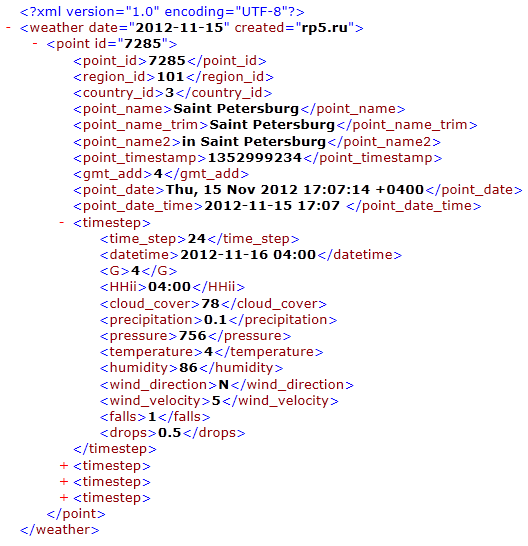
Weather forecasts for 24 points in time are exported in XML format and available at URL http://rp5.ru/xml.export.01a.php?cid=XX&pid=-1, where XX is a number that will be assigned to your permanent IP-address in our database.
To access the weather forecasts you should answer the following three questions and send them to our email: support@rp5.ru
1) The permanent IP-address that will receive forecasts.
2) Full names of the locations, as well as the country, region and district in which they are located.
3) URL of your webpage (s), where the forecasts will be visualized. If you do not intend to use weather forecasts on the Internet, please let us know where you want to use them.
The weather forecasts cost $1 for one location per month provided that you have a direct hyperlink to "rp5.ru" webpage. If you do not have a direct hyperlink, the price increases tenfold. You will have to pay after you prepare and submit to us a working prototype that will meet our requirements. The prototype development period is one month.
Payment details:
1) Electronic funds transfer system
1.1) WEB MONEY
WMZ: Z161527264575
WMR: R796865849588
1.2) Yandex.Money
Account number 4100146471504
2) Bank transfer:
Raspisaniye Pogodi Ltd.
Important note! Given our rates, monthly payment of data and - especially - monthly payment control are quite irrational. Therefore, data should be paid 12 months in advance. That is, after the approval of the prototype you will have to pay immediately for the next 12 months.
Terms and conditions for the provision of data
Conditions are mandatory. We reserve the right to block the transfer of data to importers that violate the conditions of data provisioning.
1) The data from the URL mentioned above should be taken twice a day: in the morning and in the evening after 6:00 and 18:00 UTC. That's enough to have the latest forecasts without undue burden on our server.
2) The data should be provided to visitors solely as visualization on the website importer available outside 24/7.
2.1) The name and /or address ("Reliable Prognosis" and/or rp5.ru) and the appropriate hyperlink should be placed near the visualized forecasts on the website importer. The hyperlink should be redirected to the page "rp5.ru", where weather forecasts for the respective location are displayed. For example, if forecasts are exported in St. Petersburg, the hyperlink must be as follows: http://rp5.ru/Weather_in_Saint_Petersburg,_Russia, but not: http://rp5.ru/.
2.2) It is not allowed to mention other weather websites on the pages where our forecasts are visualized.
2.3) There shall be no further transfer of data from the website importer in the form of one’s own weather stickers, e-mail messages, SMS, ftp and other types of transmissions.
3) If the importer is unable or unwilling to fulfill the conditions listed in paragraphs 2, the price of weather forecasts increases to $10 for one location per month.
4) We provide only data. Interpretation and visualization of data is performed by the importer alone, without any help from our side.
Data description
Parameter transmission method: GET.
region_id - region ID where the location is situated
country_id - country ID where the location is situated
point_name - full location name. For example, "Dubrovka (Dubrovskiy District)"
point_name_trim - short location name without brackets. For example, "Dubrovka". point_name_trim corresponds to point_name before opening the bracket. If there is no bracket, point_name_trim = point_name
point_name2 - location name used with preposition. For example, "in Dubrovka". It is used in headings like "Weather in Dubrovka" ("weather"+ point_name2)
point_timestamp - unix- timestamp of a date in the location
gmt_add - UTC- shift in hours, taking into account day-light saving time
point_date - local time in a location at the moment of creating a file with data indicating gmt_add. For example, "Sun, 12 Dec 2004 13:00:25 +0300"
point_date_time - local time in a location at the moment of creating a file with data. A less detailed format is used. For example, "2004-12-12 13:00"
time_step - forecast time step in hours from midnight (00:00 UTC) of the current day. For example, time_step = 48 means the forecast for the next 48 hours relative to 00:00 UTC of the current day.
datetime - forecast moment according to the local time (date hour: minute). For example, "2014-7-08 16:00"
G - forecast moment according to the local time in hours. For example, "16"
HHii - forecast moment according to the local time in hours and minutes. For example, "16:00"
cloud_cover - total cloudiness (%). It represents the total amount of low, medium and high cloud cover. If the amount exceeds 100%, the parameter "cloud_cover" has the value of 100%.
precipitation - precipitation depth, accumulated within 6 hours prior to the above mentioned point in time. For example, if HHii = 16:00, precipitation was accumulated from 10 to 16 o’clock. Thus, when rendering it is better to place the value of precipitation (in contrast to all other parameters) between neighboring forecast moments
pressure - atmospheric pressure
temperature - air temperature
humidity - relative humidity (%)
wind_direction - direction of wind (N-north, NE-North-East, etc.). Direction shows where the wind is blowing FROM. For example, north wind blows from the North
wind_velocity - wind speed
falls - type of precipitation (0 – lack of precipitation, 1 - rain, 2 – rain and snow, 3 - snow)
drops - coefficient of the amount of snowflakes or raindrops for visualization. Possible values: 0.5, 1, 2, 3, 4, 5, 6, 7, 8, 9, 10.The more the value, the more quantity and the larger size the raindrops and snowflakes have.
For more information see Definitions and FAQ